arch-toolkit
Arch Toolkit Showcase
An executable reference application for Android, iOS and Desktop, with shared
features in commonMain. Web is pending by explicit project decision: Easy
Navigation 1.2.0 has no JS/Wasm artifact. No alternative web navigator is provided.
Easy Navigation 1.2.0 still uses Lumber’s pre-1.2 binary signature. Sample configurations select Lumber 1.1.0 and Storage 2.0.0-rc16 for compatibility; Storage stable 1.0.1 requires the incompatible Lumber 1.4 ABI. The published Toolkit library keeps its own existing dependency version. Remove the sample pin only after Android, JVM and iOS navigation tests pass with an upstream-compatible release.
Navigation directions and platform registries are generated by Easy Navigation’s Kotlin compiler plugin. Apply its Gradle plugin only to destination-owning features; the app combines their public registries. KSP remains only for Room and Ktorfit.
Run
Use JDK 21 and the configured Android SDK. Sample projects require -PincludeSamples.
./gradlew :sample:target:desktop:run -PincludeSamples
./gradlew :sample:target:android:installDebug -PincludeSamples
On an Apple Silicon Mac, install Xcode and XcodeGen, then:
xcodegen generate --spec sample/target/ios/project.yml
open sample/target/ios/Showcase.xcodeproj
Choose the Showcase scheme and a simulator. Its build phase compiles the shared framework. Physical devices require your signing team and code signing enabled locally. CI builds the unsigned simulator host and runs KMP tests on macOS; this is not manual simulator or accessibility inspection.
Explore
- GitHub: search, language filters, pagination and retry, repository details, and the last 20 opened repository identities persisted in Room. New searches cancel previous requests and reject late results. Page failures retain rows. History is local, with no synchronization or offline GitHub mirror.
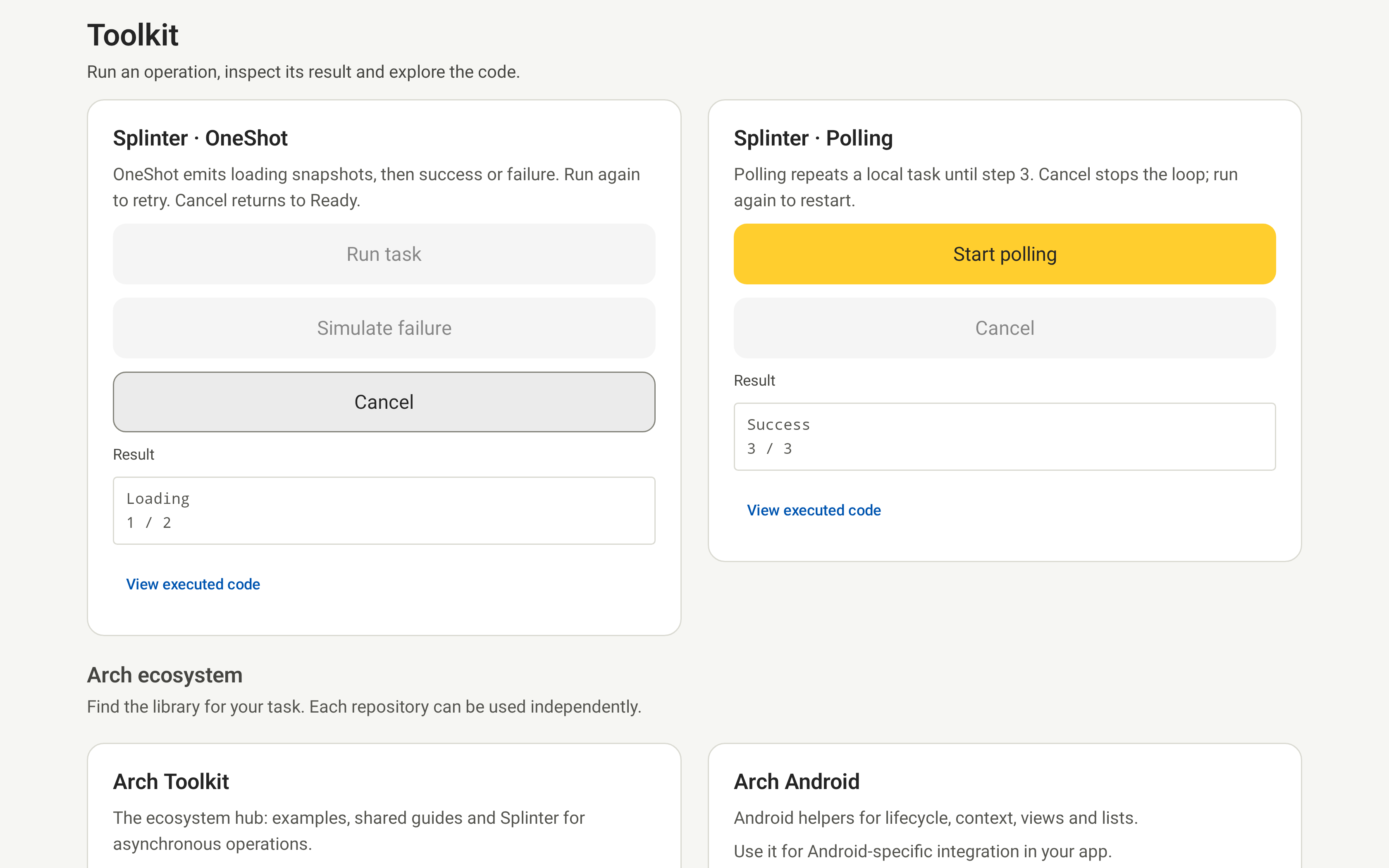
- Toolkit: Lumber writes with a dedicated tree and a clearable 100-entry buffer;
Storage create/read/update/delete with persistence across restarts. Snippets are
generated from marked regions of the actual
ToolkitDemoRepository.ktsource. Splinter adds local OneShot snapshots with success/failure/retry and a three-step polling task. Both can be cancelled and repeated. Their snippets come from the executedSplinterDemo.kt; tests use virtual time. The feature compiles the exact Splinter library sources and regression tests against the existing sample Lumber compatibility pin. Published library dependencies remain unchanged. The Arch ecosystem catalogue explains Arch Toolkit/Splinter, Arch Android, Event Observer, Lumber and Storage in plain English/Portuguese, with use cases and a GitHub-mark button opening the corresponding repository. Cards use the existing width/font-aware grid. GitHub marks are local vectors, so links do not depend on downloading icons. - Design: the app’s real theme tokens, typography, spacing, buttons, empty and error widgets. Change theme and contrast in Settings to inspect all states.
- Settings: persistent English/Portuguese (Brazil), theme and contrast. Changes
apply at runtime.
AppTextcentralizes both translations; unknown language tags fall back to English. Dates/counts follow the selected language. GitHub data and code are never translated.
Navigation and links
Feature-owned serializable routes use Easy Navigation @Route, @Scope,
@Deeplink and @ParentRoute. The app aggregates generated registries in one
Navigation3 controller. Details require only owner/name and load independently.
adb shell am start -a android.intent.action.VIEW -d "archtoolkit://github/matheus-corregiari/arch-toolkit"
./gradlew :sample:target:desktop:run -PincludeSamples --args="archtoolkit://github/matheus-corregiari/arch-toolkit"
xcrun simctl openurl booted "archtoolkit://github/matheus-corregiari/arch-toolkit"
Other paths: /github, /toolkit, /design, /settings. Android handles initial
and new intents; iOS forwards SwiftUI URL events; Desktop accepts a launch argument.
Foreign schemes and invalid links are ignored. Navigation3 saves the typed stack;
GitHub saves query, filters and rows without restoring loading flags. Back returns
to the previous destination. Top-level tabs start a new stack.
Architecture
Path under sample/ |
Responsibility |
|---|---|
target/{android,ios,desktop,web} |
Platform launchers; web pending |
shared/app |
Composition, Koin, shell and global links |
shared/features/{github-sample,toolkit-sample,design-sample,settings} |
Views, ViewModels, state and routes |
shared/data/repository |
Repository objects (RO), mapping and source coordination |
shared/data/source/remote |
Ktorfit interfaces and transport models |
shared/data/source/local |
Room entities/DAO and persistence factories |
shared/structure/http |
Clients, engines, JSON, timeouts and transport setup |
shared/structure/design/core |
Tokens, theme and translated UI text |
shared/structure/design/widget |
Reusable presentation widgets |
shared/structure/core |
Small shared models and formatting |
Features depend on repository contracts and design, never other features or sources.
Repository state does not expose transport/Room models. Dependencies enter classes
through constructors; Koin resolves them at composition boundaries. Cancellation
remains cancellation. HTTP uses platform TLS validation. verifyShowcaseBoundaries
checks forbidden project dependencies and cycles as part of ciLint.
Add a feature or demo
- Use an existing feature’s Gradle setup under
shared/features; define its state, constructor-injected ViewModel and tests incommonMain/commonTest. - Declare serializable routes with small identities and annotated destinations.
Add the generated registry and ViewModel registration to
shared/app. - Reuse design tokens/widgets and add both translations to
AppText. - For demos, expose an actual operation, controls, visible result, reset and failure
handling. Mark the executable source and extend
generateDemoSnippets. - Prefer a documented catalogue card when no meaningful portable demo exists.
Never add an Android-only dependency to
commonMain.
Official ecosystem references: Arch Android, Event Observer, Lumber, Storage, Easy Navigation.
Use as a base
Retain the launchers/composition, substitute your features and repositories, and keep constructor injection and shared design/test seams. Change application IDs, display names and persistence namespaces before shipping. This guide creates no separate application.
Check
./gradlew ciBuild ciTest ciCoverage ciLint ciDocs -PincludeSamples -PreleaseVersion=2.0.0-rc19
python -m mkdocs build --strict
Tests exercise cancellation/out-of-order responses, page retry, saved list state,
repository mappings/errors, Storage CRUD, language restoration, bounded logging,
formatting and generated links. Desktop navigation tests exercise back and saved
stack restoration. See SHOWCASE_PLAN.md for the current validation record.
Lazy list rows and bounded logs/history are implementation choices, not measured
performance claims.
Android screenshot regression tests
Google’s experimental Compose Preview Screenshot Testing plugin uses AndroidX
@Preview to render the actual shared feature content through Layoutlib, without
an emulator. AGP remains at 9.4. KMP features own their src/screenshotTest sources;
the Android target supplies the runner and reference storage. Screenshot-only
project dependencies are checked separately; production targets still depend on
shared:app only.
Coverage matrix
The suite contains 101 references. Following Android’s guidance, representative configurations are sampled instead of multiplying every state by every device.
| Area | References | Visual contracts |
|---|---|---|
| GitHub list and detail | 29 | Loading, empty search, content/recent history, pagination loading/error/end, all four domain errors, missing metadata, long names/descriptions/topics, localized dates and counts |
| Settings | 10 | All six light/dark contrast palettes, system/language selections, narrow large text, wide layout |
| Toolkit | 18 | Lumber output, Storage empty/saved/read/deleted/invalid-key/error/busy states, ecosystem catalogue, expanded executable source, five-repository catalogue with GitHub marks, scrolled content |
| Design | 8 | Real tokens, button styles, disabled/loading/error/empty widgets, selected/unselected chips, scrolled content |
| App shell | 21 | All selected destinations, compact bottom bar, tablet rail, large-window drawer, phone/tablet landscape, tablet portrait, localized and large-text navigation |
| Shared widgets | 4 | Original English/light, Portuguese/dark, large font and wide high-contrast checks |
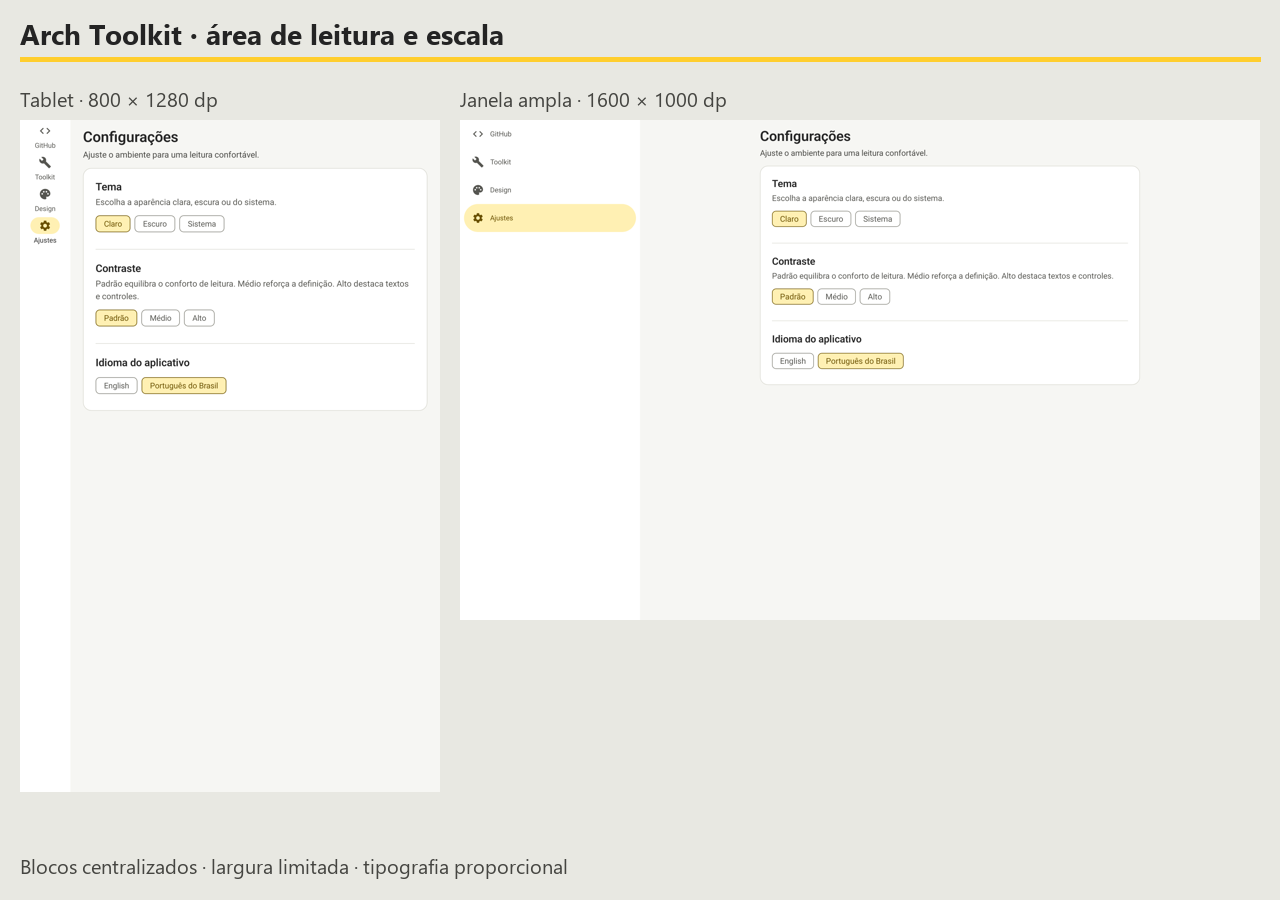
Representative feature content runs in light English, dark Portuguese, 320dp narrow layouts with 1.5x and 2x fonts, and 840dp wide layouts. High contrast has focused coverage in Settings, Design and GitHub. Shell breakpoints include 600dp and short 800 × 360 landscape windows. All four destinations also run inside the 1280 × 800 tablet shell; Settings includes 800 × 1280 portrait and Toolkit includes 2x tablet text. A 1600 × 1000 shell checks the centered content limit. This is not an exhaustive device matrix or an accessibility certification.
Fixtures use API 35 and fixed dates, counts and text. Content composables receive state and callbacks; production route adapters retain ViewModels and effects. Tests do not start Koin, network or persistence. Repository avatars use an empty URI; image downloading is outside this visual contract. Layoutlib captures loading indicators at its fixed preview frame. These are Android rendering checks, not iOS/Desktop pixel baselines.
Running and reviewing
Use the same Windows/JDK 21 environment as the dedicated CI job:
./gradlew :sample:target:android:validateDebugScreenshotTest -PincludeSamples
For an intentional visual change, regenerate locally, inspect every changed PNG and commit references alongside the UI change:
./gradlew :sample:target:android:updateDebugScreenshotTest -PincludeSamples
Feature tests: sample/shared/features/*/src/screenshotTest/kotlin/.
Shell tests: sample/shared/app/src/screenshotTest/kotlin/.
Shared setup/widget tests: sample/target/android/src/screenshotTest/kotlin/.
The host explicitly registers each feature’s source directory and test dependency.
References: sample/target/android/src/screenshotTestDebug/reference/.
HTML report: sample/target/android/build/reports/screenshotTest/preview/debug/index.html.
CI uploads reports and actual/diff images as showcase-screenshots, including on
failure. CI validates only; it never updates references.
Add a state case for each visually distinct feature state, and a configuration
case for different wrapping, navigation or theme behavior. Keep fixtures fixed
and scroll to the section being tested. Generated references require visual review.
Interaction tests remain responsible for callbacks, navigation and transitions;
the existing JVM ToolkitUiTest capture is diagnostic only.
References: Android screenshot testing guidance, Compose Preview Screenshot Testing.
Visual system and color study
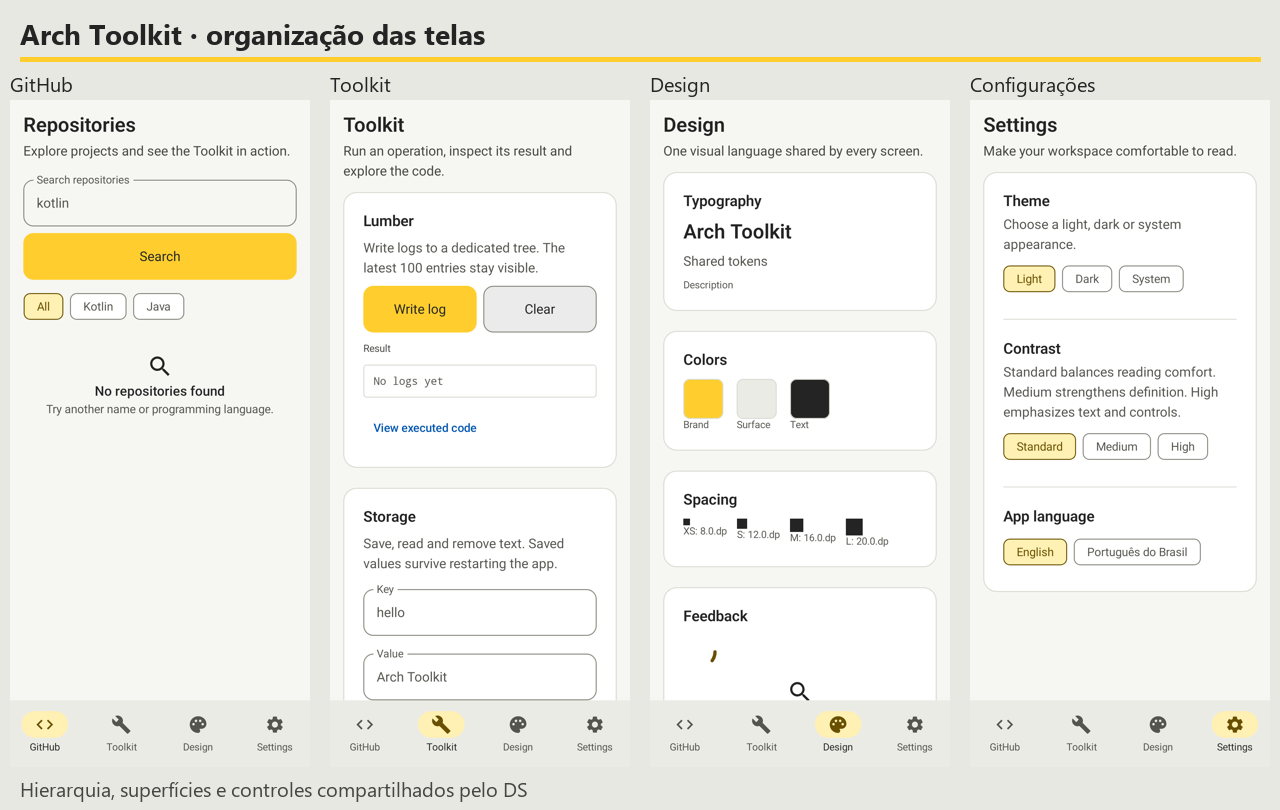
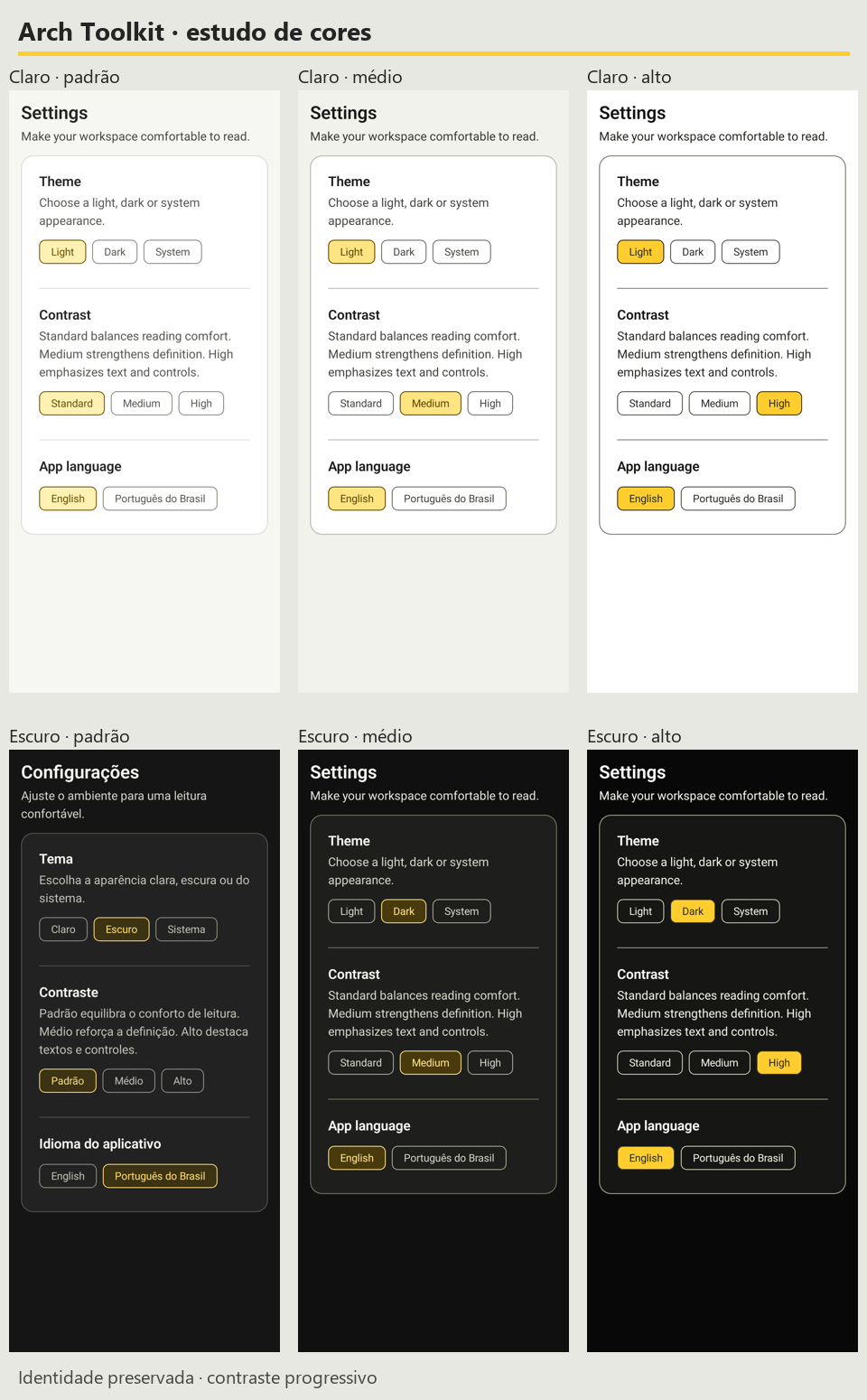
The visual identity keeps brand yellow #FFCE2E, warm neutral surfaces, rounded
corners and the existing sans-serif typography. Yellow uses dark ink #242424
in both themes (10.44:1), rather than white text. Blue links and semantic red/green
remain reserved for links and feedback.
Each destination uses a top-aligned AppPage with horizontal centering and
adaptive fill width. GitHub/Toolkit/Design cap their workspace at 1120 dp;
Settings and details cap reading width at 760 dp. Gutters are 16/24/32 dp by
window size. Page headers expose a title and task description; short windows
omit the description to leave more room for controls and results. Sections use
24 dp padding. GitHub places search above results and keeps history expandable.
Toolkit orders controls, results and expandable executable source. Settings
uses one continuous preference panel with dividers.
AppButton, AppTextField and AppChoiceGroup are the shared controls. Choices
wrap with translations and font scaling; small buttons retain a 48 dp minimum
height. Compact windows with font scales above 1.3 use a labeled sections menu
instead of forcing four enlarged labels into a bottom bar. Selected controls and
navigation use the same yellow-derived surface and
foreground roles. Selection semantics, labels and heading semantics remain native.
Responsive composition
Layouts use the space actually available after navigation and insets, following Android adaptive layout guidance. Column and pane counts react to available width and font scale, without device-name checks.
| Area | Compact or enlarged text | Landscape and tablet |
|---|---|---|
| Toolkit and Design | One scrollable column | Two columns when each retains 360 dp scaled by font size, plus a 24 dp gap |
| Settings | One continuous scrollable preference panel | Same panel, centered horizontally with a 760 dp cap |
| GitHub search | Search above results; stacked field/action when text needs room | Field and Search action share a row when width permits; filters follow below; controls scroll within half the remaining height |
| Repository detail | One scrollable information card | Reading width capped at 760 dp |
| Navigation | Bottom bar in compact portrait, rail in landscape | Rail on medium/tablet widths; drawer from 1200 dp window width |
The section grid is limited to two columns, including very wide windows. Cards keep their stable keys when the column count changes, preserving edited demo inputs. The Toolkit ecosystem spans the grid. At 2x text the grid falls back to one column, even on a tablet, so controls and snippets retain room to wrap.
JVM interaction tests resize a filled Storage form from two columns to one and back, and exercise search/results at 800 × 360 with 2x text. The screenshot matrix covers the navigation shell as well as populated GitHub landscape results.
Comfortable reading area
Pages fill available width within their role-specific cap, fill the available height and remain top-aligned. Long content scrolls. Pagination belongs to the lazy results list, so short results do not stretch the footer to the bottom.
Typography uses semantic roles and normal system font scaling:
| Text role | Compact | Medium / expanded |
|---|---|---|
| Page heading | 24 / 30 sp | 28 / 34 sp |
| Section heading | 18 / 24 sp | 20 / 26 sp |
| Body | 16 / 24 sp | 16 / 24 sp |
| Metadata | 13 / 18 sp | 14 / 20 sp |
| Code | 13 / 22 sp monospace | 14 / 22 sp monospace |
JVM tests verify horizontal centering/top alignment, preserving edited forms across resizing, keyboard search, and access to controls/results in short windows with 2x text. A separate regression ensures the complete Search action is visible in normal-font landscape.
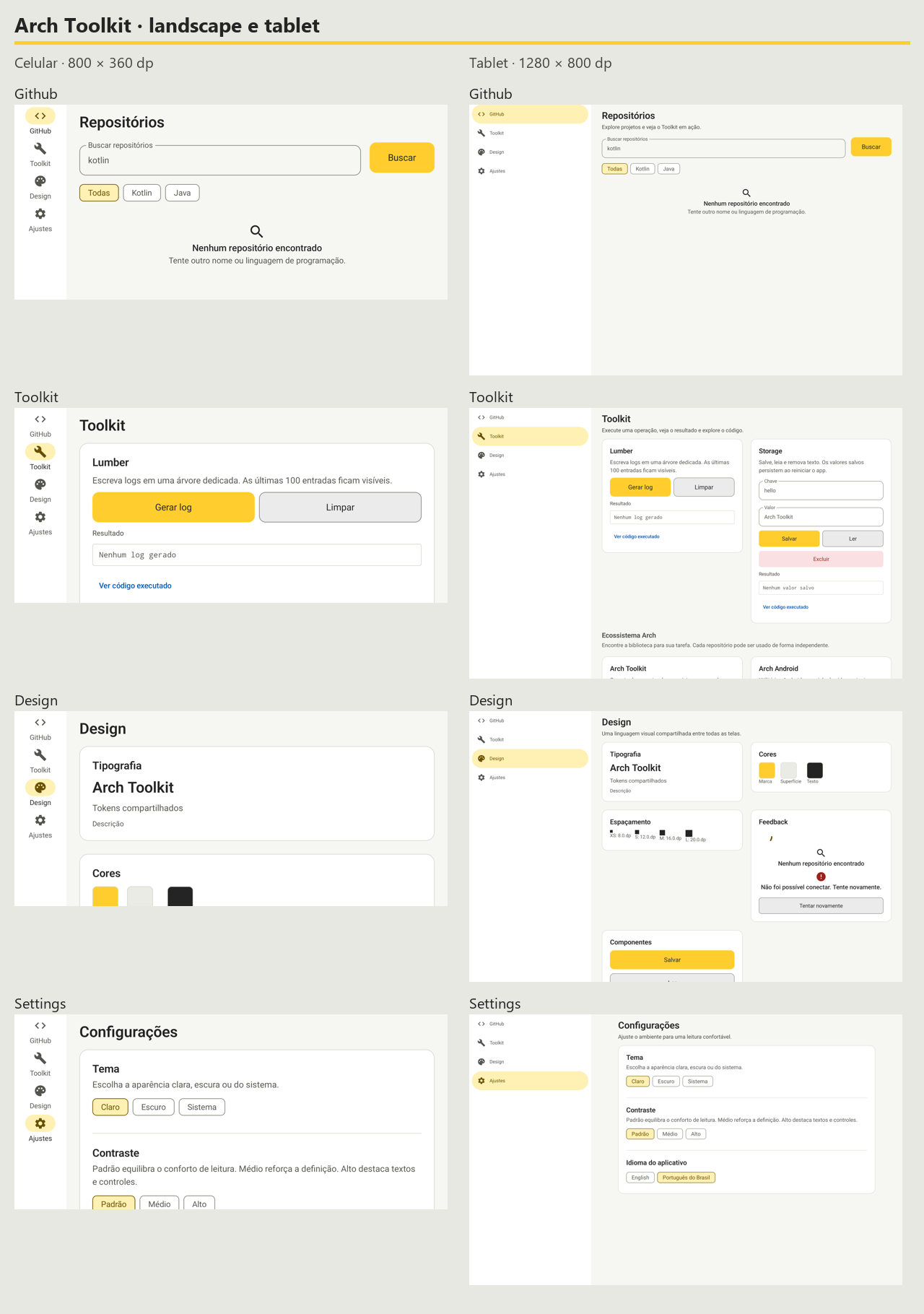
Contrast changes text, control outlines and surface separation, rather than only surface opacity. All base surfaces are opaque to keep their contrast independent of the content underneath. Standard provides a calm hierarchy; medium deepens body text and outlines; high makes control and surface edges explicit while retaining the brand accent. Material color roles are mapped completely to the DS, including container levels, fixed roles, outlines, error and inverse colors.
The exact palette values and canvas/card contrast ratios are recorded in the implemented visual study. Automated KMP tests additionally check normal text, links and semantic text against canvas, card and inset surfaces (4.5:1), control outlines (3:1), medium/high body text (7:1), brand ink, selected controls and Material roles. Decorative borders and disabled controls have separate roles. These checks are not an accessibility certification.
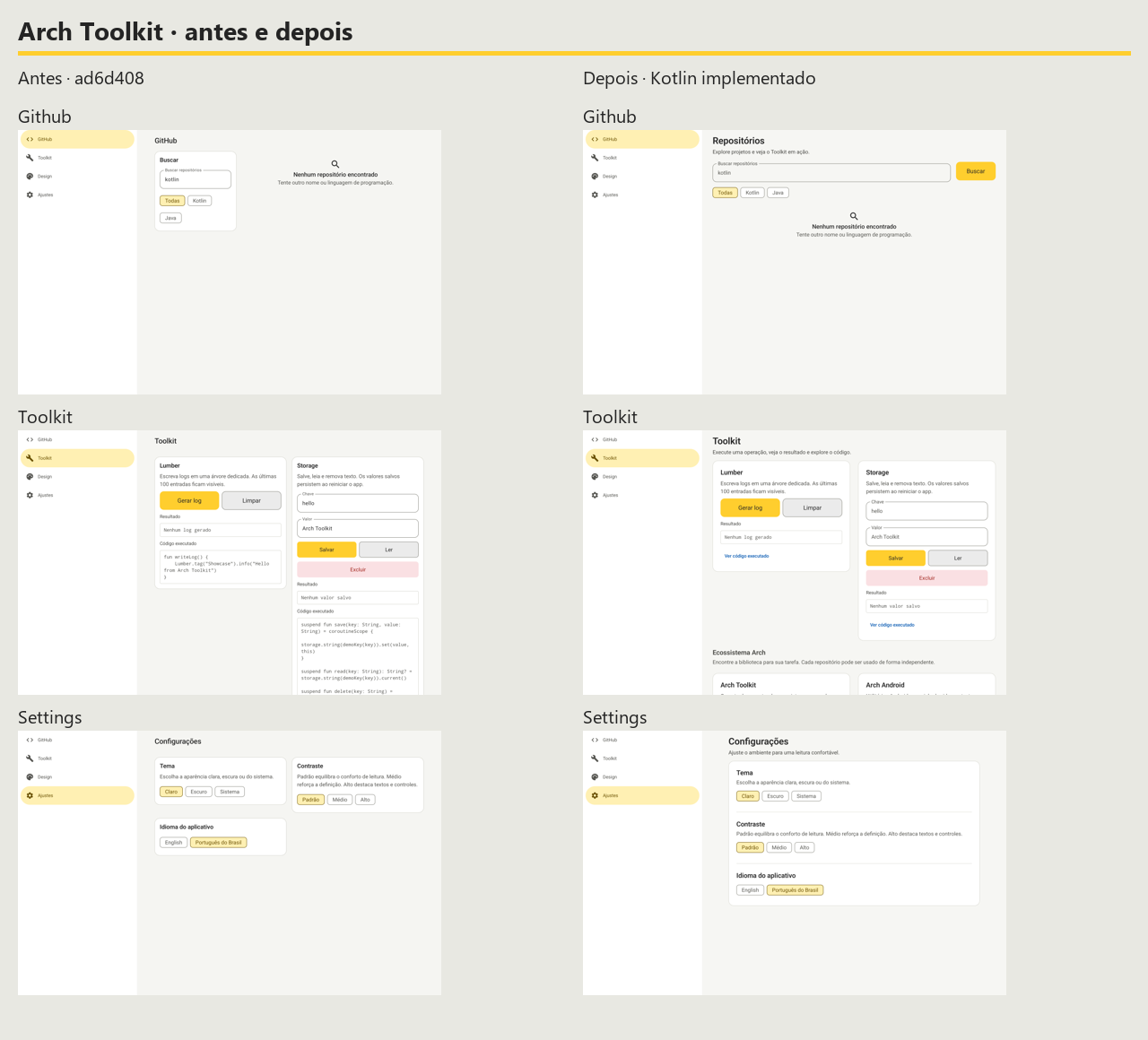
The refactor record covers the 300 ms debounce, separate draft/active query, transient-state-free snapshots, bootstrap image loader, immutable page mapping and neutral Kotlin packages.
References: WCAG text contrast and non-text contrast. The Android screenshot suite covers all six settings palettes, both languages, compact/wide layouts, and font scales through 2.0. Review the rendered references before accepting a deliberate visual change; do not relax comparison thresholds.
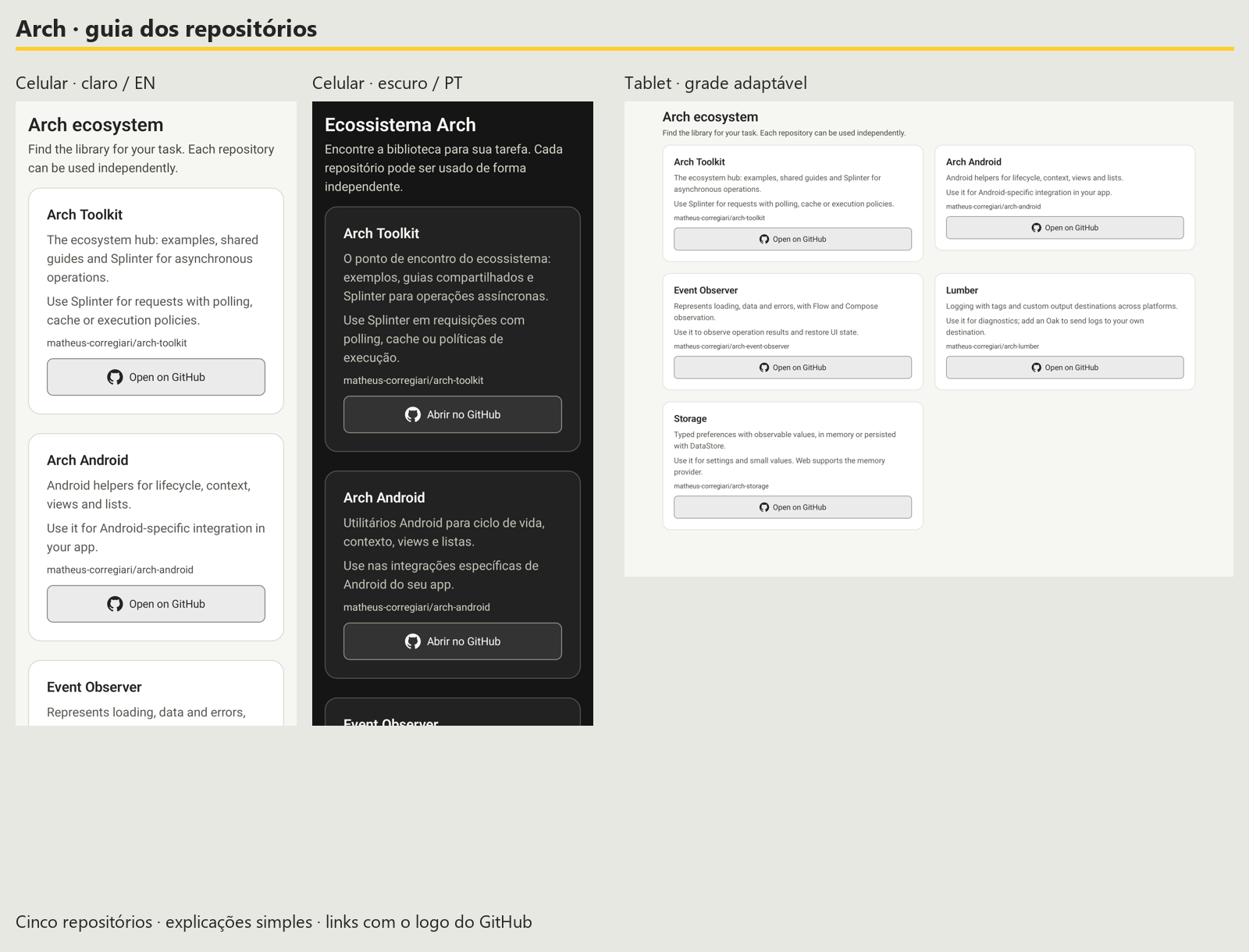
The repository link interaction test checks all five destination URLs. Four
dedicated previews cover English/light, Portuguese/dark, tablet and 2x fonts.
The GitHub mark comes from Primer Octicons; attribution is in the repository’s
THIRD_PARTY_NOTICES.md.